
Meta Launches AI-Powered Pixel Enrichment: What Advertisers Need to Know in 2026
Meta is launching AI-powered Pixel enrichment in 2026. Learn how automatic event enrichment works, what data may be shared, privacy risks, and how advertisers can prepare.

AI in Advertising
05.06.2026
Get weekly ad updates. No spam

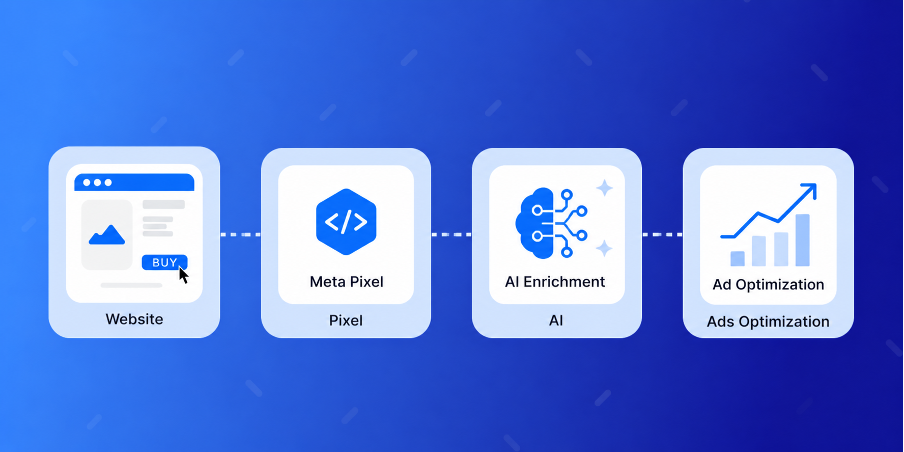
Meta has announced a major update to Meta Pixel — AI-powered event enrichment. The new feature will allow Pixel to automatically collect and share additional information about website pages and products without requiring advertisers to manually configure extra parameters.
According to Meta, automatic rollout for eligible Pixels will begin on May 30, 2026.
According to Meta, automatic rollout for eligible Pixels will begin on May 30, 2026.
What Will Change
Meta Pixel will be able to automatically identify and send additional page and product context, including:
Meta states that this AI-powered enrichment is designed to help its algorithms better understand user behavior and improve ad optimization performance.
- product information,
- product page details,
- media content,
- business information,
- additional catalog signals.
Meta states that this AI-powered enrichment is designed to help its algorithms better understand user behavior and improve ad optimization performance.
Key Benefits Advertisers Can Expect
1. Improved Campaign Performance
More detailed website signals can help Meta deliver ads more efficiently to users who are more likely to convert.
2. Higher Quality Product Catalogs
Meta will be able to automatically synchronize and enrich product details, helping improve catalog freshness and accuracy.
3. Simplified Pixel Setup
For many advertisers, this update may reduce the need for manual product tagging and advanced event parameter configuration.
4. Automatic Event Enrichment
Shared events will include more contextual information about pages and products, potentially improving campaign optimization and audience understanding.
More detailed website signals can help Meta deliver ads more efficiently to users who are more likely to convert.
2. Higher Quality Product Catalogs
Meta will be able to automatically synchronize and enrich product details, helping improve catalog freshness and accuracy.
3. Simplified Pixel Setup
For many advertisers, this update may reduce the need for manual product tagging and advanced event parameter configuration.
4. Automatic Event Enrichment
Shared events will include more contextual information about pages and products, potentially improving campaign optimization and audience understanding.
Comparison with Competitors: Google, TikTok, Pinterest
Meta is by no means the first platform to adopt automated ad signal enrichment. Google, TikTok, and Pinterest have been developing similar technologies for several years, but the logic and depth of data collection differ across each platform.
The key difference in Meta’s approach : AI enrichment collects not only user data but also the page’s context itself—product descriptions, images, business information, and catalog elements. In effect, Meta obtains a condensed "snapshot" of the page so that its algorithms can better classify the audience and creative assets. This goes deeper than any of its counterparts—and that is precisely why it requires a particularly thorough audit before activation.
What Data Can Be Sent to Meta — Examples by Industry
Many advertisers underestimate the amount of information that can be automatically extracted from a page. Below are specific examples of what AI enrichment can potentially extract and send to Meta.
Before May 30, 2026, it is especially important to review these pages and ensure that either the data is anonymized or AI enrichment is disabled for the relevant domains.
- E-commerce and retail. Product name, SKU, price, size, color, brand, category, stock availability, description, photos, reviews, rating. On checkout pages—data on the contents of the shopping cart and the total amount.
- Pharmacies and medical websites. Drug name, active ingredient, dosage, indications for use, prescription status, price. On service pages—procedure name, doctor’s specialty, diagnoses covered by the consultation.
- Finance and banking. Loan amount from the calculator, term, interest rate, product type (mortgage, consumer loan, microloan), plan name, terms and conditions. On investment product pages: instrument name, minimum amount, risk level.
- Legal Services. Service category (divorce, bankruptcy, car accidents, inheritance, immigration), consultation fee, case descriptions, lawyers' names and areas of expertise.
- Education and Online Courses. Course title, curriculum, duration, cost, instructor’s name, skill level, target audience, certificates.
- B2B and Lead Generation. Client company name in case studies, industry, business size in the form of a request, user position, geography, budget information if requested on the page.
- Dating, Psychology, Support. Type of request, topics of articles the user read, sensitive categories—relationships, mental health, addictions.
Before May 30, 2026, it is especially important to review these pages and ensure that either the data is anonymized or AI enrichment is disabled for the relevant domains.
Do Advertisers Need to Take Action?
Meta has confirmed that:
At the same time, advertisers will still be able to:
- no manual code changes are required,
- existing campaigns and targeting will not be disrupted,
- the feature will automatically activate for eligible Pixels.
At the same time, advertisers will still be able to:
- disable the feature,
- manage the types of data being shared,
- control data sharing settings through Events Manager.
What Businesses Should Review Before Enabling the Feature
While the update offers potential performance benefits, advertisers should carefully review what information exists on their websites before enabling automatic enrichment.
Businesses should verify:
Businesses should verify:
- whether pages contain sensitive information,
- what customer or business data could potentially be shared,
- whether their privacy policies comply with GDPR and Meta requirements.

How to Disable AI Enrichment: A Step-by-Step Guide
If your business handles sensitive information or you’re not yet ready for automatic signal enrichment, you can disable the feature in advance, without waiting for the mass rollout on May 30, 2026.
Step 1. Go to Events Manager. Open Meta Business Suite and go to the Events Manager section.
Step 2. Select the desired Pixel. In the left column, select the data source—the Pixel for which you want to change the settings. If you have multiple accounts or domains, repeat these steps for each one.
Step 3. Open the Settings section. In the top Pixel menu, select the "Settings" tab. Scroll down to the section related to automatic event enrichment—it may be labeled "Automatic Event Enrichment," "Detailed page and product information," or "Advanced Matching," depending on the interface language and update date.
Step 4. Disable automatic enrichment. Toggle the switch to the Off position. If necessary, you can disable only specific data categories—for example, keep basic product information but prevent the transmission of media or business signals.
Step 5. Save the changes and verify via Test Events. In the "Test Events" section, open your website and verify that the disabled parameters are no longer being transmitted. The event parameters column should not contain any fields related to automatic page context.
Step 6. Document your settings. Save screenshots of your settings as of the date of the change. This will be useful for GDPR compliance audits and for internal documentation regarding the processing of personal data.
If you have the Conversions API set up alongside Pixel, check to make sure data transmission isn’t being duplicated on the server side—disabling it at the Pixel level does not automatically disable CAPI.
Step 1. Go to Events Manager. Open Meta Business Suite and go to the Events Manager section.
Step 2. Select the desired Pixel. In the left column, select the data source—the Pixel for which you want to change the settings. If you have multiple accounts or domains, repeat these steps for each one.
Step 3. Open the Settings section. In the top Pixel menu, select the "Settings" tab. Scroll down to the section related to automatic event enrichment—it may be labeled "Automatic Event Enrichment," "Detailed page and product information," or "Advanced Matching," depending on the interface language and update date.
Step 4. Disable automatic enrichment. Toggle the switch to the Off position. If necessary, you can disable only specific data categories—for example, keep basic product information but prevent the transmission of media or business signals.
Step 5. Save the changes and verify via Test Events. In the "Test Events" section, open your website and verify that the disabled parameters are no longer being transmitted. The event parameters column should not contain any fields related to automatic page context.
Step 6. Document your settings. Save screenshots of your settings as of the date of the change. This will be useful for GDPR compliance audits and for internal documentation regarding the processing of personal data.
If you have the Conversions API set up alongside Pixel, check to make sure data transmission isn’t being duplicated on the server side—disabling it at the Pixel level does not automatically disable CAPI.
Who Will Benefit Most From This Update?
The new AI-powered enrichment feature may be especially valuable for:
- e-commerce brands,
- online stores,
- businesses with large product catalogs,
- Dynamic Ads campaigns,
- advertisers using Advantage+ Shopping Campaigns.
Summary
AI-powered enrichment for Meta Pixel represents another step toward a more automated advertising ecosystem. For many e-commerce advertisers, the feature could improve signal quality, catalog optimization, and campaign performance without requiring complex technical implementation.
However, before automatic activation begins, businesses should carefully review what website data may be shared with Meta and ensure that their setup aligns with both privacy regulations and internal data policies.
However, before automatic activation begins, businesses should carefully review what website data may be shared with Meta and ensure that their setup aligns with both privacy regulations and internal data policies.
FAQ
Do I need to change the Meta Pixel code before May 30, 2026?
No. Meta has confirmed that no technical changes are required on the website side. The enhancement is activated automatically on the platform side.
Will this feature work with Consent Mode and cookie banners?
Yes, AI enrichment takes the user’s consent status into account. If a visitor has opted out of cookies, extended signals should not be sent. You’ll need to verify this manually via Test Events after updating the banner.
What should I do if my website is on Shopify, WooCommerce, Tilda, or Webflow?
In most cases, no code changes are needed—the Pixel is installed via standard integration. However, you should check what data is being pulled on the product and checkout pages and, if necessary, hide sensitive elements from parsing.
Should I disable the feature if I’ve already set up the Conversions API?
If your CAPI is configured correctly and manually passes the necessary parameters, AI enrichment may duplicate data. In this case, it’s wise to either disable automatic enrichment or carefully deduplicate events using event_id.
How can I tell if the feature is already enabled for my Pixel?
A notification will appear in the Pixel settings section of Events Manager, and new event parameters (such as product_details, page_context, and business_info) will start appearing in Test Events. Their presence indicates that data enrichment is already active.
Will this affect advertising costs?
In the short term, CPM and CPA may fluctuate—the algorithms need to "re-learn" based on the new signals. In the medium term (4−8 weeks after activation), Meta predicts improved optimization, but the actual effect will depend on the quality of the data on the website.
Meta has announced a major update to Meta Pixel — AI-powered event enrichment. The new feature will allow Pixel to automatically collect and share additional information about website pages and products without requiring advertisers to manually configure extra parameters.
According to Meta, automatic rollout for eligible Pixels will begin on May 30, 2026.
According to Meta, automatic rollout for eligible Pixels will begin on May 30, 2026.
What Will Change
Meta Pixel will be able to automatically identify and send additional page and product context, including:
Meta states that this AI-powered enrichment is designed to help its algorithms better understand user behavior and improve ad optimization performance.
- product information,
- product page details,
- media content,
- business information,
- additional catalog signals.
Meta states that this AI-powered enrichment is designed to help its algorithms better understand user behavior and improve ad optimization performance.
Key Benefits Advertisers Can Expect
1. Improved Campaign Performance
More detailed website signals can help Meta deliver ads more efficiently to users who are more likely to convert.
2. Higher Quality Product Catalogs
Meta will be able to automatically synchronize and enrich product details, helping improve catalog freshness and accuracy.
3. Simplified Pixel Setup
For many advertisers, this update may reduce the need for manual product tagging and advanced event parameter configuration.
4. Automatic Event Enrichment
Shared events will include more contextual information about pages and products, potentially improving campaign optimization and audience understanding.
More detailed website signals can help Meta deliver ads more efficiently to users who are more likely to convert.
2. Higher Quality Product Catalogs
Meta will be able to automatically synchronize and enrich product details, helping improve catalog freshness and accuracy.
3. Simplified Pixel Setup
For many advertisers, this update may reduce the need for manual product tagging and advanced event parameter configuration.
4. Automatic Event Enrichment
Shared events will include more contextual information about pages and products, potentially improving campaign optimization and audience understanding.
Comparison with Competitors: Google, TikTok, Pinterest
Meta is by no means the first platform to adopt automated ad signal enrichment. Google, TikTok, and Pinterest have been developing similar technologies for several years, but the logic and depth of data collection differ across each platform.
The key difference in Meta’s approach : AI enrichment collects not only user data but also the page’s context itself—product descriptions, images, business information, and catalog elements. In effect, Meta obtains a condensed "snapshot" of the page so that its algorithms can better classify the audience and creative assets. This goes deeper than any of its counterparts—and that is precisely why it requires a particularly thorough audit before activation.
What Data Can Be Sent to Meta — Examples by Industry
Many advertisers underestimate the amount of information that can be automatically extracted from a page. Below are specific examples of what AI enrichment can potentially extract and send to Meta.
Before May 30, 2026, it is especially important to review these pages and ensure that either the data is anonymized or AI enrichment is disabled for the relevant domains.
- E-commerce and retail. Product name, SKU, price, size, color, brand, category, stock availability, description, photos, reviews, rating. On checkout pages—data on the contents of the shopping cart and the total amount.
- Pharmacies and medical websites. Drug name, active ingredient, dosage, indications for use, prescription status, price. On service pages—procedure name, doctor’s specialty, diagnoses covered by the consultation.
- Finance and banking. Loan amount from the calculator, term, interest rate, product type (mortgage, consumer loan, microloan), plan name, terms and conditions. On investment product pages: instrument name, minimum amount, risk level.
- Legal Services. Service category (divorce, bankruptcy, car accidents, inheritance, immigration), consultation fee, case descriptions, lawyers' names and areas of expertise.
- Education and Online Courses. Course title, curriculum, duration, cost, instructor’s name, skill level, target audience, certificates.
- B2B and Lead Generation. Client company name in case studies, industry, business size in the form of a request, user position, geography, budget information if requested on the page.
- Dating, Psychology, Support. Type of request, topics of articles the user read, sensitive categories—relationships, mental health, addictions.
Before May 30, 2026, it is especially important to review these pages and ensure that either the data is anonymized or AI enrichment is disabled for the relevant domains.
Do Advertisers Need to Take Action?
Meta has confirmed that:
At the same time, advertisers will still be able to:
- no manual code changes are required,
- existing campaigns and targeting will not be disrupted,
- the feature will automatically activate for eligible Pixels.
At the same time, advertisers will still be able to:
- disable the feature,
- manage the types of data being shared,
- control data sharing settings through Events Manager.
What Businesses Should Review Before Enabling the Feature
While the update offers potential performance benefits, advertisers should carefully review what information exists on their websites before enabling automatic enrichment.
Businesses should verify:
Businesses should verify:
- whether pages contain sensitive information,
- what customer or business data could potentially be shared,
- whether their privacy policies comply with GDPR and Meta requirements.
How to Disable AI Enrichment: A Step-by-Step Guide
If your business handles sensitive information or you’re not yet ready for automatic signal enrichment, you can disable the feature in advance, without waiting for the mass rollout on May 30, 2026.
Step 1. Go to Events Manager. Open Meta Business Suite and go to the Events Manager section.
Step 2. Select the desired Pixel. In the left column, select the data source—the Pixel for which you want to change the settings. If you have multiple accounts or domains, repeat these steps for each one.
Step 3. Open the Settings section. In the top Pixel menu, select the "Settings" tab. Scroll down to the section related to automatic event enrichment—it may be labeled "Automatic Event Enrichment," "Detailed page and product information," or "Advanced Matching," depending on the interface language and update date.
Step 4. Disable automatic enrichment. Toggle the switch to the Off position. If necessary, you can disable only specific data categories—for example, keep basic product information but prevent the transmission of media or business signals.
Step 5. Save the changes and verify via Test Events. In the "Test Events" section, open your website and verify that the disabled parameters are no longer being transmitted. The event parameters column should not contain any fields related to automatic page context.
Step 6. Document your settings. Save screenshots of your settings as of the date of the change. This will be useful for GDPR compliance audits and for internal documentation regarding the processing of personal data.
If you have the Conversions API set up alongside Pixel, check to make sure data transmission isn’t being duplicated on the server side—disabling it at the Pixel level does not automatically disable CAPI.
Step 1. Go to Events Manager. Open Meta Business Suite and go to the Events Manager section.
Step 2. Select the desired Pixel. In the left column, select the data source—the Pixel for which you want to change the settings. If you have multiple accounts or domains, repeat these steps for each one.
Step 3. Open the Settings section. In the top Pixel menu, select the "Settings" tab. Scroll down to the section related to automatic event enrichment—it may be labeled "Automatic Event Enrichment," "Detailed page and product information," or "Advanced Matching," depending on the interface language and update date.
Step 4. Disable automatic enrichment. Toggle the switch to the Off position. If necessary, you can disable only specific data categories—for example, keep basic product information but prevent the transmission of media or business signals.
Step 5. Save the changes and verify via Test Events. In the "Test Events" section, open your website and verify that the disabled parameters are no longer being transmitted. The event parameters column should not contain any fields related to automatic page context.
Step 6. Document your settings. Save screenshots of your settings as of the date of the change. This will be useful for GDPR compliance audits and for internal documentation regarding the processing of personal data.
If you have the Conversions API set up alongside Pixel, check to make sure data transmission isn’t being duplicated on the server side—disabling it at the Pixel level does not automatically disable CAPI.
Who Will Benefit Most From This Update?
The new AI-powered enrichment feature may be especially valuable for:
- e-commerce brands,
- online stores,
- businesses with large product catalogs,
- Dynamic Ads campaigns,
- advertisers using Advantage+ Shopping Campaigns.
Summary
AI-powered enrichment for Meta Pixel represents another step toward a more automated advertising ecosystem. For many e-commerce advertisers, the feature could improve signal quality, catalog optimization, and campaign performance without requiring complex technical implementation.
However, before automatic activation begins, businesses should carefully review what website data may be shared with Meta and ensure that their setup aligns with both privacy regulations and internal data policies.
However, before automatic activation begins, businesses should carefully review what website data may be shared with Meta and ensure that their setup aligns with both privacy regulations and internal data policies.
FAQ
Do I need to change the Meta Pixel code before May 30, 2026?
No. Meta has confirmed that no technical changes are required on the website side. The enhancement is activated automatically on the platform side.
Will this feature work with Consent Mode and cookie banners?
Yes, AI enrichment takes the user’s consent status into account. If a visitor has opted out of cookies, extended signals should not be sent. You’ll need to verify this manually via Test Events after updating the banner.
What should I do if my website is on Shopify, WooCommerce, Tilda, or Webflow?
In most cases, no code changes are needed—the Pixel is installed via standard integration. However, you should check what data is being pulled on the product and checkout pages and, if necessary, hide sensitive elements from parsing.
Should I disable the feature if I’ve already set up the Conversions API?
If your CAPI is configured correctly and manually passes the necessary parameters, AI enrichment may duplicate data. In this case, it’s wise to either disable automatic enrichment or carefully deduplicate events using event_id.
How can I tell if the feature is already enabled for my Pixel?
A notification will appear in the Pixel settings section of Events Manager, and new event parameters (such as product_details, page_context, and business_info) will start appearing in Test Events. Their presence indicates that data enrichment is already active.
Will this affect advertising costs?
In the short term, CPM and CPA may fluctuate—the algorithms need to "re-learn" based on the new signals. In the medium term (4−8 weeks after activation), Meta predicts improved optimization, but the actual effect will depend on the quality of the data on the website.
You might also like...