
You've Received a Meta IP Complaint: What Businesses Should Know
Real Meta IP complaint or phishing scam? How to verify notices, respond to trademark and copyright reports, and protect your Business Manager.

Moderation and Policy
05.12.2026
Get weekly ad updates. No spam

In recent months, businesses have been receiving an increasing number of emails "from Meta" regarding trademark, copyright, or brand rights violations. Some companies are genuinely facing complaints from rights holders, while others are dealing with sophisticated phishing attempts disguised as official support from Facebook and Instagram.
The problem is that many of these emails look convincing: the Meta logo, mentions of policy violations, a sense of urgency, and threats to restrict access to Business Manager or advertising accounts. As a result, companies click on the links, enter their Business Manager credentials, and lose access to their advertising assets.
Let’s break down how complaints from legal entities work at Meta, how they differ from a standard ad account ban, and how businesses can distinguish a genuine Meta email from a scam.
The problem is that many of these emails look convincing: the Meta logo, mentions of policy violations, a sense of urgency, and threats to restrict access to Business Manager or advertising accounts. As a result, companies click on the links, enter their Business Manager credentials, and lose access to their advertising assets.
Let’s break down how complaints from legal entities work at Meta, how they differ from a standard ad account ban, and how businesses can distinguish a genuine Meta email from a scam.
What Is a Complaint from a Legal Entity on Meta
A complaint from a legal entity is an official request from a company or rights holder submitted through Meta’s brand protection tools. Most often, a complaint from a legal entity is sent when:
- The ad creative resembles another brand. Another brand’s logo, font, packaging, mascot, video clip, or photo from an official source is used.
- The Page or Ad Account name resembles another brand. Especially if the name includes "Official," "Store," "Shop," plus the name of a well-known brand.
- The ad leads to a copycat website or a marketplace selling counterfeit goods. Even if the site is yours, you may still face accusations of selling counterfeit goods.
- Domain Verification is linked to your Business, but another brand is used in the ad copy/USP.
- Comparative advertising. "Better than X," direct mentions of competitors using their visual identity.
- Influencer campaign. A blogger uses brand materials without a license, and the ad is launched from your account.
- Reseller/dealer exceeds their rights. You sell legal products but use marketing materials that the rights holder has not authorized.
Why have these complaints increased?
Meta is actively strengthening its Brand Rights Protection systems and tools to combat:
At the same time, there has been a rise in phishing emails that mimic the style of official Meta notifications. Scammers exploit the fear of having an ad account blocked to gain access to Business Manager.
That’s why it’s important for businesses today to understand the difference between:
- counterfeit brands,
- fake ads,
- impersonation,
- advertising scams,
- and counterfeit products.
At the same time, there has been a rise in phishing emails that mimic the style of official Meta notifications. Scammers exploit the fear of having an ad account blocked to gain access to Business Manager.
That’s why it’s important for businesses today to understand the difference between:
- a legitimate complaint,
- an automatic ad account restriction,
- and a typical phishing email.
How a complaint differs from a standard ban on an advertising account
This is a very important point—most mistakes start right here. Businesses try to dismiss a complaint filed by a legal entity as if it were a standard ban, using the standard "request review" process, and end up wasting time.
What tools does Meta use to protect brands?
Meta is developing several areas of Brand Rights Protection. Among the main ones are:
Through these, companies can:
- Intellectual Property Reporting Center,
- trademark reporting tools,
- copyright reporting,
- impersonation reporting,
- Commerce & Ads protection systems.
Through these, companies can:
- report fake pages,
- remove fraudulent ads,
- report brand copying,
- protect trademarks,
- request the removal of content that infringes on copyright.
What a real letter from Meta looks like
This is what an actual takedown notice from a copyright holder looks like (see example below). Personal information has been redacted.
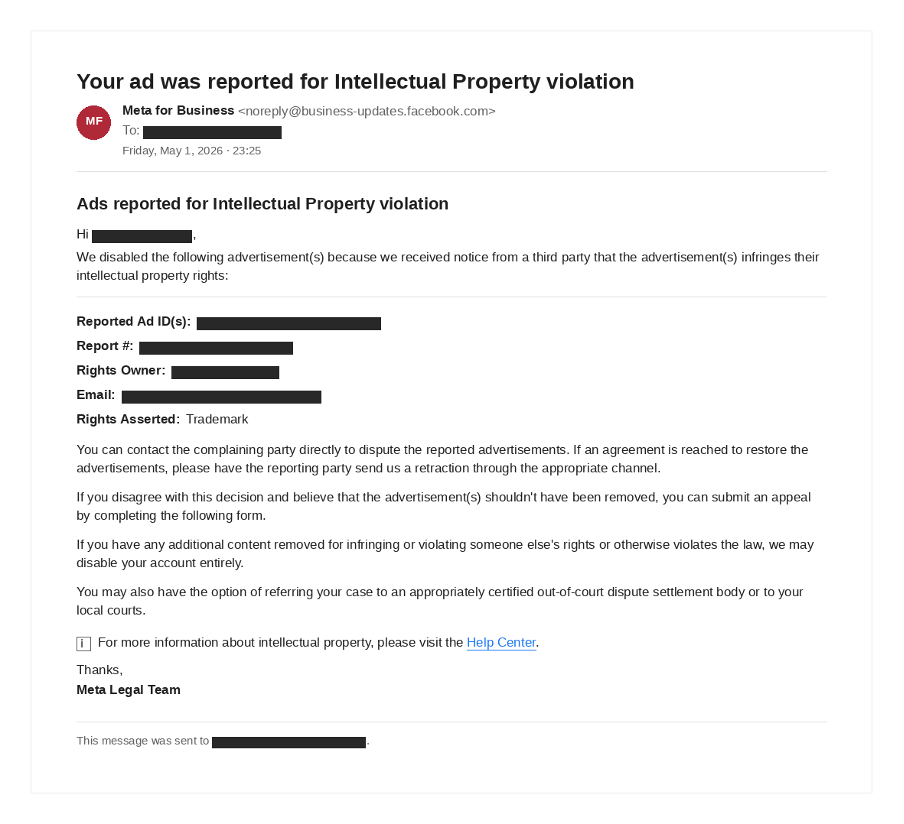
You can identify this notification by several characteristics:
And most importantly: this email is always duplicated within Meta — in Business Manager → Account Quality / Support Home — and the Ad ID listed can be found in Ads Manager with the status "Rejected" or "Removed for IP." If there is no match, it is most likely a phishing attempt.
- Subject line — "Your ad was reported for Intellectual Property violation."
- Sender — Official Meta domains: @business-updates.facebook.com, @facebookmail.com, @support.facebook.com, @meta.com.
- Specific IDs and details within the email — Reported Ad ID, Report #, Rights Owner (brand name), lawyer’s contact email, Rights Asserted (Trademark / Copyright / Impersonation / Counterfeit).
- Standard Meta options — contact the claimant directly and request a retraction, file an appeal via the form within Meta, or refer the case to out-of-court settlement or court.
- Signature — Meta Legal Team; links in the email lead only to facebook.com / business.facebook.com / facebook.com/help .
And most importantly: this email is always duplicated within Meta — in Business Manager → Account Quality / Support Home — and the Ad ID listed can be found in Ads Manager with the status "Rejected" or "Removed for IP." If there is no match, it is most likely a phishing attempt.
How to Spot Phishing Scams Masquerading as Meta
Most scam emails follow the same pattern:
The main goal is to trick the user into visiting a fake login page.
Check any email "from Meta" against these points before clicking anything:
Never click on a link in an email. Open Business Manager directly and check to see if the same complaint is listed there. If not, ignore the email and mark it as phishing.
- "Your Business Manager account will be deleted,"
- "A complaint has been filed against you,"
- "Verify your account details,"
- "Complete the verification process."
The main goal is to trick the user into visiting a fake login page.
Check any email "from Meta" against these points before clicking anything:
- Suspicious domain. Legitimate emails come from domains such as @facebookmail.com, @support.facebook.com, @meta.com, and @business.fb.com. Any domains like @meta-support.xyz, @facebookhelpcenter.online, or Cyrillic variations such as @meеta.com are phishing attempts.
- Pressure and Urgency. Phrases: "Reply within 24 hours"; "Your account will be permanently disabled"; "Final warning".
- Suspicious links. Hover your cursor over the link: it should lead to facebook.com, business.facebook.com, or facebook.com/help. Link shorteners (bit.ly, cutt. ly, t.co), redirects through advertising domains, or IP addresses are signs of phishing.
- Requests to enter your password. Meta never asks for passwords or one-time codes via email.
- Text errors. Many scam emails contain: broken grammar, strange translations, unnatural phrasing.
- Attachments or DOC/PDF files with macros. Genuine complaint notifications are not sent as document files.
Never click on a link in an email. Open Business Manager directly and check to see if the same complaint is listed there. If not, ignore the email and mark it as phishing.
Step-by-step guide if the complaint is valid
A clear action plan that our team follows:
Contest (counter-notice): submit a counter-notice with supporting documents via the Meta form.
Negotiate: contact the complainant and ask them to withdraw the complaint. This is very effective if you are a reseller or partner.
If you receive multiple complaints and they are systematic, this is a sign that the brand views your account as a threat. At this stage, it’s almost always better to seek paid legal advice rather than rely on guesswork.
- Document the issue. Take screenshots of the notification within Business Manager—the entire message, including the URL and date. You’ll need this if you have to escalate the matter.
- Don’t delete the disputed creative right away. Investigate first—sometimes deleting it before a response is interpreted as an "admission of guilt" and complicates the appeal.
- Check who the complainant is. Often, it’s an outsourced law firm representing multiple brands. Google the contact person’s name; their contact information is often listed on the firm’s website.
- Decide on a strategy:
Contest (counter-notice): submit a counter-notice with supporting documents via the Meta form.
Negotiate: contact the complainant and ask them to withdraw the complaint. This is very effective if you are a reseller or partner.
- Respond on time. Usually within 7−14 days. After the deadline, Meta automatically sides with the complainant.
- At the same time, check your Account Quality and Page Quality for other restrictions: complaints often come in batches.
- Save the log. Record every action, date, and screenshot of Meta’s response—in case of a repeat complaint or escalation to Brand Rights Protection.
If you receive multiple complaints and they are systematic, this is a sign that the brand views your account as a threat. At this stage, it’s almost always better to seek paid legal advice rather than rely on guesswork.
How to Protect Your Brand Proactively (For Brand Owners)
If you are a rights holder and frequently see third-party ads running under your brand, fake pages being created, or counterfeit products being sold, Meta offers the following tools:
This isn’t a marketing option—it's part of brand information security—especially for e-commerce, beauty, fashion, and fintech segments, where scam ads using your brand name cost you conversions every week.
- Sign up for Brand Rights Protection. Apply via Apply for Brand Rights Protection. You’ll need to verify your business entity and provide brand documentation.
- Enable keyword monitoring. In BRP, you can set up tracking by brand name, domains, and key SKUs.
- Use the IP Reporting Center. A convenient way to file one-time complaints without enabling BRP.
- Tagged creatives and watermarks. Helps prove the original source in disputed cases.
- Register trademarks in the relevant countries. Without an active trademark in the campaign country, Meta may reject your IP complaint.
This isn’t a marketing option—it's part of brand information security—especially for e-commerce, beauty, fashion, and fintech segments, where scam ads using your brand name cost you conversions every week.
Summary
These days, emails "from Meta" are a reality for businesses that run Facebook and Instagram ads.
Sometimes, they’re genuine complaints from rights holders. But more often than not, they’re phishing attempts to gain access to Business Manager.
The golden rule: don’t panic and don’t act impulsively. Genuine complaints can be verified using Meta’s official tools, while most scam emails give themselves away through their domain, links, and strange demands.
The better a business understands how Brand Rights Protection and intellectual property complaints work at Meta, the lower the risk of losing advertising assets or access to accounts.
Sometimes, they’re genuine complaints from rights holders. But more often than not, they’re phishing attempts to gain access to Business Manager.
The golden rule: don’t panic and don’t act impulsively. Genuine complaints can be verified using Meta’s official tools, while most scam emails give themselves away through their domain, links, and strange demands.
The better a business understands how Brand Rights Protection and intellectual property complaints work at Meta, the lower the risk of losing advertising assets or access to accounts.
FAQ
Can Meta block a page based on a single complaint from a business?
Yes, it can—especially if the complaint involves a trademark or impersonation and the complainant is verified. So don’t ignore the notification, even if it seems like a minor issue.
How long do I have to respond?
Typically, 7−14 days from the date of notification within Meta. After the deadline, a decision will be made without your input.
What happens if you simply remove the ad?
Removing the disputed creative does not automatically dismiss the complaint. It’s best to respond via the Meta form at the same time or ask the complainant to withdraw their complaint.
Do you need a lawyer?
For a single complaint, usually not. If there are multiple complaints, they come from a law firm, and there’s a risk of your Business Portfolio being removed—then yes, a lawyer with experience in IP matters at Meta will pay for themselves in just one case.
In recent months, businesses have been receiving an increasing number of emails "from Meta" regarding trademark, copyright, or brand rights violations. Some companies are genuinely facing complaints from rights holders, while others are dealing with sophisticated phishing attempts disguised as official support from Facebook and Instagram.
The problem is that many of these emails look convincing: the Meta logo, mentions of policy violations, a sense of urgency, and threats to restrict access to Business Manager or advertising accounts. As a result, companies click on the links, enter their Business Manager credentials, and lose access to their advertising assets.
Let’s break down how complaints from legal entities work at Meta, how they differ from a standard ad account ban, and how businesses can distinguish a genuine Meta email from a scam.
The problem is that many of these emails look convincing: the Meta logo, mentions of policy violations, a sense of urgency, and threats to restrict access to Business Manager or advertising accounts. As a result, companies click on the links, enter their Business Manager credentials, and lose access to their advertising assets.
Let’s break down how complaints from legal entities work at Meta, how they differ from a standard ad account ban, and how businesses can distinguish a genuine Meta email from a scam.
What Is a Complaint from a Legal Entity on Meta
A complaint from a legal entity is an official request from a company or rights holder submitted through Meta’s brand protection tools. Most often, a complaint from a legal entity is sent when:
- The ad creative resembles another brand. Another brand’s logo, font, packaging, mascot, video clip, or photo from an official source is used.
- The Page or Ad Account name resembles another brand. Especially if the name includes "Official," "Store," "Shop," plus the name of a well-known brand.
- The ad leads to a copycat website or a marketplace selling counterfeit goods. Even if the site is yours, you may still face accusations of selling counterfeit goods.
- Domain Verification is linked to your Business, but another brand is used in the ad copy/USP.
- Comparative advertising. "Better than X," direct mentions of competitors using their visual identity.
- Influencer campaign. A blogger uses brand materials without a license, and the ad is launched from your account.
- Reseller/dealer exceeds their rights. You sell legal products but use marketing materials that the rights holder has not authorized.
Why have these complaints increased?
Meta is actively strengthening its Brand Rights Protection systems and tools to combat:
At the same time, there has been a rise in phishing emails that mimic the style of official Meta notifications. Scammers exploit the fear of having an ad account blocked to gain access to Business Manager.
That’s why it’s important for businesses today to understand the difference between:
- counterfeit brands,
- fake ads,
- impersonation,
- advertising scams,
- and counterfeit products.
At the same time, there has been a rise in phishing emails that mimic the style of official Meta notifications. Scammers exploit the fear of having an ad account blocked to gain access to Business Manager.
That’s why it’s important for businesses today to understand the difference between:
- a legitimate complaint,
- an automatic ad account restriction,
- and a typical phishing email.
How a complaint differs from a standard ban on an advertising account
This is a very important point—most mistakes start right here. Businesses try to dismiss a complaint filed by a legal entity as if it were a standard ban, using the standard "request review" process, and end up wasting time.
What tools does Meta use to protect brands?
Meta is developing several areas of Brand Rights Protection. Among the main ones are:
Through these, companies can:
- Intellectual Property Reporting Center,
- trademark reporting tools,
- copyright reporting,
- impersonation reporting,
- Commerce & Ads protection systems.
Through these, companies can:
- report fake pages,
- remove fraudulent ads,
- report brand copying,
- protect trademarks,
- request the removal of content that infringes on copyright.
What a real letter from Meta looks like
This is what an actual takedown notice from a copyright holder looks like (see example below). Personal information has been redacted.
You can identify this notification by several characteristics:
And most importantly: this email is always duplicated within Meta — in Business Manager → Account Quality / Support Home — and the Ad ID listed can be found in Ads Manager with the status "Rejected" or "Removed for IP." If there is no match, it is most likely a phishing attempt.
- Subject line — "Your ad was reported for Intellectual Property violation."
- Sender — Official Meta domains: @business-updates.facebook.com, @facebookmail.com, @support.facebook.com, @meta.com.
- Specific IDs and details within the email — Reported Ad ID, Report #, Rights Owner (brand name), lawyer’s contact email, Rights Asserted (Trademark / Copyright / Impersonation / Counterfeit).
- Standard Meta options — contact the claimant directly and request a retraction, file an appeal via the form within Meta, or refer the case to out-of-court settlement or court.
- Signature — Meta Legal Team; links in the email lead only to facebook.com / business.facebook.com / facebook.com/help .
And most importantly: this email is always duplicated within Meta — in Business Manager → Account Quality / Support Home — and the Ad ID listed can be found in Ads Manager with the status "Rejected" or "Removed for IP." If there is no match, it is most likely a phishing attempt.
How to Spot Phishing Scams Masquerading as Meta
Most scam emails follow the same pattern:
The main goal is to trick the user into visiting a fake login page.
Check any email "from Meta" against these points before clicking anything:
Never click on a link in an email. Open Business Manager directly and check to see if the same complaint is listed there. If not, ignore the email and mark it as phishing.
- "Your Business Manager account will be deleted,"
- "A complaint has been filed against you,"
- "Verify your account details,"
- "Complete the verification process."
The main goal is to trick the user into visiting a fake login page.
Check any email "from Meta" against these points before clicking anything:
- Suspicious domain. Legitimate emails come from domains such as @facebookmail.com, @support.facebook.com, @meta.com, and @business.fb.com. Any domains like @meta-support.xyz, @facebookhelpcenter.online, or Cyrillic variations such as @meеta.com are phishing attempts.
- Pressure and Urgency. Phrases: "Reply within 24 hours"; "Your account will be permanently disabled"; "Final warning".
- Suspicious links. Hover your cursor over the link: it should lead to facebook.com, business.facebook.com, or facebook.com/help. Link shorteners (bit.ly, cutt. ly, t.co), redirects through advertising domains, or IP addresses are signs of phishing.
- Requests to enter your password. Meta never asks for passwords or one-time codes via email.
- Text errors. Many scam emails contain: broken grammar, strange translations, unnatural phrasing.
- Attachments or DOC/PDF files with macros. Genuine complaint notifications are not sent as document files.
Never click on a link in an email. Open Business Manager directly and check to see if the same complaint is listed there. If not, ignore the email and mark it as phishing.
Step-by-step guide if the complaint is valid
A clear action plan that our team follows:
Contest (counter-notice): submit a counter-notice with supporting documents via the Meta form.
Negotiate: contact the complainant and ask them to withdraw the complaint. This is very effective if you are a reseller or partner.
If you receive multiple complaints and they are systematic, this is a sign that the brand views your account as a threat. At this stage, it’s almost always better to seek paid legal advice rather than rely on guesswork.
- Document the issue. Take screenshots of the notification within Business Manager—the entire message, including the URL and date. You’ll need this if you have to escalate the matter.
- Don’t delete the disputed creative right away. Investigate first—sometimes deleting it before a response is interpreted as an "admission of guilt" and complicates the appeal.
- Check who the complainant is. Often, it’s an outsourced law firm representing multiple brands. Google the contact person’s name; their contact information is often listed on the firm’s website.
- Decide on a strategy:
Contest (counter-notice): submit a counter-notice with supporting documents via the Meta form.
Negotiate: contact the complainant and ask them to withdraw the complaint. This is very effective if you are a reseller or partner.
- Respond on time. Usually within 7−14 days. After the deadline, Meta automatically sides with the complainant.
- At the same time, check your Account Quality and Page Quality for other restrictions: complaints often come in batches.
- Save the log. Record every action, date, and screenshot of Meta’s response—in case of a repeat complaint or escalation to Brand Rights Protection.
If you receive multiple complaints and they are systematic, this is a sign that the brand views your account as a threat. At this stage, it’s almost always better to seek paid legal advice rather than rely on guesswork.
How to Protect Your Brand Proactively (For Brand Owners)
If you are a rights holder and frequently see third-party ads running under your brand, fake pages being created, or counterfeit products being sold, Meta offers the following tools:
This isn’t a marketing option—it's part of brand information security—especially for e-commerce, beauty, fashion, and fintech segments, where scam ads using your brand name cost you conversions every week.
- Sign up for Brand Rights Protection. Apply via Apply for Brand Rights Protection. You’ll need to verify your business entity and provide brand documentation.
- Enable keyword monitoring. In BRP, you can set up tracking by brand name, domains, and key SKUs.
- Use the IP Reporting Center. A convenient way to file one-time complaints without enabling BRP.
- Tagged creatives and watermarks. Helps prove the original source in disputed cases.
- Register trademarks in the relevant countries. Without an active trademark in the campaign country, Meta may reject your IP complaint.
This isn’t a marketing option—it's part of brand information security—especially for e-commerce, beauty, fashion, and fintech segments, where scam ads using your brand name cost you conversions every week.
Summary
These days, emails "from Meta" are a reality for businesses that run Facebook and Instagram ads.
Sometimes, they’re genuine complaints from rights holders. But more often than not, they’re phishing attempts to gain access to Business Manager.
The golden rule: don’t panic and don’t act impulsively. Genuine complaints can be verified using Meta’s official tools, while most scam emails give themselves away through their domain, links, and strange demands.
The better a business understands how Brand Rights Protection and intellectual property complaints work at Meta, the lower the risk of losing advertising assets or access to accounts.
Sometimes, they’re genuine complaints from rights holders. But more often than not, they’re phishing attempts to gain access to Business Manager.
The golden rule: don’t panic and don’t act impulsively. Genuine complaints can be verified using Meta’s official tools, while most scam emails give themselves away through their domain, links, and strange demands.
The better a business understands how Brand Rights Protection and intellectual property complaints work at Meta, the lower the risk of losing advertising assets or access to accounts.
FAQ
Can Meta block a page based on a single complaint from a business?
Yes, it can—especially if the complaint involves a trademark or impersonation and the complainant is verified. So don’t ignore the notification, even if it seems like a minor issue.
How long do I have to respond?
Typically, 7−14 days from the date of notification within Meta. After the deadline, a decision will be made without your input.
What happens if you simply remove the ad?
Removing the disputed creative does not automatically dismiss the complaint. It’s best to respond via the Meta form at the same time or ask the complainant to withdraw their complaint.
Do you need a lawyer?
For a single complaint, usually not. If there are multiple complaints, they come from a law firm, and there’s a risk of your Business Portfolio being removed—then yes, a lawyer with experience in IP matters at Meta will pay for themselves in just one case.
You might also like...