
Black Friday 2026: How to Scale Ad Spend Without Getting Your Accounts Restricted
Black Friday 2026 is November 27. Learn how to raise spending limits, pass ad review and protect the learning phase so your Facebook ad account stays live during the sale.

Moderation and Policy
10.15.2026
Get weekly ad updates. No spam

Black Friday falls on November 27 this year, with Cyber Monday on November 30. Last year US shoppers spent a record $ 11.8 billion online on Black Friday alone, according to Adobe Analytics data. Most of that money moves in a few hours.
Ecommerce teams spend weeks getting ready: creative calendars, discount ladders, stock checks, but there are plenty of things that can throw a wrench in the works. Like suddenly getting your account restricted. Or maybe the card is declined at the billing threshold. Or perhaps a daily spending limit cuts delivery by lunchtime. Every hour offline during the peak week is revenue that won’t come back. Each restart resets campaigns back to the learning phase exactly when stable delivery matters most.
This guide covers what actually breaks Facebook ad accounts during Black Friday and the legitimate steps that prevent it. There will be tricks to get around moderation, that sooner rather than later stop working. Just preparation, that should give you more than enough time to do it properly.
Ecommerce teams spend weeks getting ready: creative calendars, discount ladders, stock checks, but there are plenty of things that can throw a wrench in the works. Like suddenly getting your account restricted. Or maybe the card is declined at the billing threshold. Or perhaps a daily spending limit cuts delivery by lunchtime. Every hour offline during the peak week is revenue that won’t come back. Each restart resets campaigns back to the learning phase exactly when stable delivery matters most.
This guide covers what actually breaks Facebook ad accounts during Black Friday and the legitimate steps that prevent it. There will be tricks to get around moderation, that sooner rather than later stop working. Just preparation, that should give you more than enough time to do it properly.
Why ad accounts break during the biggest sale of the year
Step 1: Run an account health check now
Step 2: Raise your spending ceiling before November
Step 3: Get creatives and landing pages approved before the rush
Step 4: Protect the learning phase
Step 5: Build redundancy into your account structure
If your ad account is restricted during the sale
Black Friday 2026 timeline
Final thoughts
FAQ
Step 1: Run an account health check now
Step 2: Raise your spending ceiling before November
Step 3: Get creatives and landing pages approved before the rush
Step 4: Protect the learning phase
Step 5: Build redundancy into your account structure
If your ad account is restricted during the sale
Black Friday 2026 timeline
Final thoughts
FAQ

Why ad accounts break during the biggest sale of the year
Black Friday doesn’t create any new risks. It stacks the existing ones into the same four days.
Every single one of these points is way easier to handle in October. All of them together dropping right on top of you on November 27 is how a month of work falls apart before noon.
- Spend spikes look like anomalies. An account that spent $ 2,000 a day in October and $ 15,000 on Thanksgiving stands out like a sore thumb. Meta applies a daily spending limit to new accounts and to accounts with quality issues, and that limit grows only with time and good standing.
- Review queues get longer. Meta says its ad review is typically completed within 24 hours, but can take longer. During a sale week, thousands of advertisers push new creatives at once. You can imagine how it affects the wait.
- Landing pages change at the worst moment. New prices, countdown timers, banners, sold-out products. Any of these can turn an approved ad into a noncompliant one.
- Payments fail. Higher spend hits the billing threshold more often. One declined charge can pause delivery across the account.
- Learning resets. Big edits during the sale send ad sets back into learning, and performance gets unstable.
Every single one of these points is way easier to handle in October. All of them together dropping right on top of you on November 27 is how a month of work falls apart before noon.
Step 1: Run an account health check now
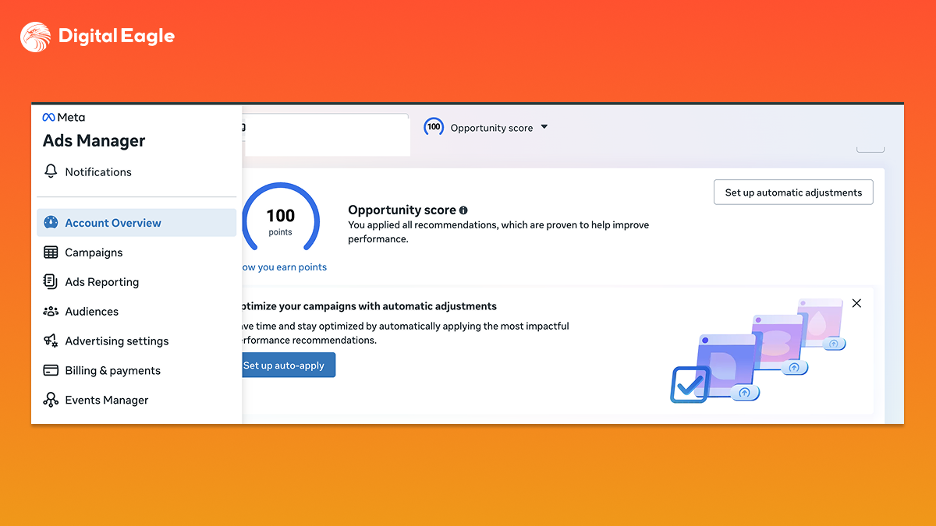
Start in Account Overview. Look for rejected ads, pending appeals and restricted assets. Old violations matter: under Meta’s Advertising Standards, a violation found at any point can lead to restrictions on the Business Account or its assets, not only the ad.
- Fix or appeal open rejections this month. You don’t want an appeal still pending during the sale week.
- Complete business verification. Make sure the legal entity, payment method and website domain all point to the same company.
- Turn on two-factor authentication for every admin. A compromised admin profile is one of the fastest ways to lose a Business Manager.
- Add a second admin, so one locked personal profile doesn’t freeze the whole business.
- Remove old employees, freelancers and partners who no longer need access.
Step 2: Raise your spending ceiling before November
There’s no button that lifts a Meta-set daily spending limit on demand. It increases as the account stays in good standing, so the answer to a Meta ad account spending limit increase is history, not a support ticket filed on Thanksgiving Day.
Ramp spend gradually through late October and early November. Raise budgets in steps instead of jumping on sale week. An account that already spent close to Black Friday levels in mid-November looks normal on the day itself.
Then deal with payments, because this is where many accounts actually stumble:
Ramp spend gradually through late October and early November. Raise budgets in steps instead of jumping on sale week. An account that already spent close to Black Friday levels in mid-November looks normal on the day itself.
Then deal with payments, because this is where many accounts actually stumble:
- Raise the billing threshold early. Meta tends to increase it gradually as successful payments build up, so a request made in November may not land in time.
- Add a backup payment method to the ad account, ideally from a different issuer.
- Warn your bank. Tell the card issuer about expected volume so its fraud filters don’t block a large charge at 2 a.m.
- Check card limits. A corporate card that covers October spend may not cover three times that.
Step 3: Get creatives and landing pages approved before the rush
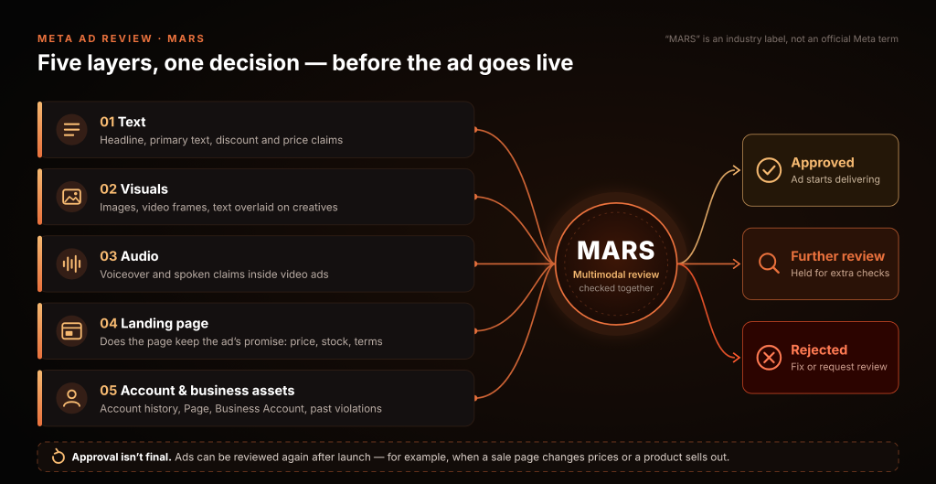
Meta’s own policy states that review may cover an ad’s images, video, text and targeting, plus its landing page or other destinations. It also says ads can be reviewed again after they go live. So approval on Monday doesn’t protect an ad whose page changes on Friday.
Industry reviews describe the current system as multimodal: text, images, audio and the landing page are checked together, as one unit, before the ad is shown. Some of these reviews call it MARS (Multimodal Ad Review System). Note that Meta itself hasn’t used this name in its official materials, so treat it as an industry label. The practical point holds either way: the ad and the page are judged together.
Black Friday creates its own set of mismatches:
The fix is mostly timing. Upload Black Friday creatives 10 to 14 days early and schedule them to start on the sale date, so they pass review while queues are still short. Point them at the final version of the sale page, not a draft. Once the sale starts, freeze page edits. If a price has to change, change the ad as well. And only make claims you can prove on the page.
Industry reviews describe the current system as multimodal: text, images, audio and the landing page are checked together, as one unit, before the ad is shown. Some of these reviews call it MARS (Multimodal Ad Review System). Note that Meta itself hasn’t used this name in its official materials, so treat it as an industry label. The practical point holds either way: the ad and the page are judged together.
Black Friday creates its own set of mismatches:
- Price gaps. The ad says 50% off, the page shows 30%, or the discount only applies to some items.
- Fake urgency. A countdown timer that resets on reload, or "last day" copy for a sale that runs a week.
- Sold-out products. The hero item sells out and the page turns thin or redirects somewhere else.
- Hidden conditions. Free shipping in the ad, a minimum order buried on the page.
- New pop-ups and redirects added for the sale and never checked.
The fix is mostly timing. Upload Black Friday creatives 10 to 14 days early and schedule them to start on the sale date, so they pass review while queues are still short. Point them at the final version of the sale page, not a draft. Once the sale starts, freeze page edits. If a price has to change, change the ad as well. And only make claims you can prove on the page.
Step 4: Protect the learning phase
Meta’s delivery system needs roughly 50 optimization events within seven days after launch or after a significant edit to exit the learning phase. Significant edits include changes to creative, targeting, the optimization event and large budget changes. In sale week, that reset is expensive.
- Launch Black Friday ad sets one to two weeks early on more modest budgets, so they exit learning before the sale starts.
- Use budget scheduling to raise budgets for specific dates and hours instead of editing them by hand at midnight.
- Scale in steps. Many media buyers keep single budget changes at around 20% to lower the chance of a reset.
- Consolidate. Fewer, larger ad sets collect events faster than many small ones.
- Don’t swap creatives inside winning ad sets mid-sale. Test new ads in a separate ad set.
Step 5: Build redundancy into your account structure
One ad account means a single point of failure. If it goes down on Black Friday, everything goes down with it. Legitimate redundancy means a second ad account under the same verified business, with its own payment method, warmed up with real spend and carrying the same compliant, already approved creatives.
One rule here is not optional. Meta does not allow advertisers to create new accounts to get around an enforcement. A backup account is for keeping compliant campaigns running if something technical fails, not for relaunching an ad that was rejected. If an account was restricted for a real violation, fix the violation first.
This is where agency ad accounts change the picture. Digital Eagle’s whitelisted agency accounts carry a higher trust level and are set up for high-volume spend, with 24/7 top-ups and a dedicated account manager. The ads still have to follow Meta’s policies. What changes is the infrastructure around them.
One rule here is not optional. Meta does not allow advertisers to create new accounts to get around an enforcement. A backup account is for keeping compliant campaigns running if something technical fails, not for relaunching an ad that was rejected. If an account was restricted for a real violation, fix the violation first.
This is where agency ad accounts change the picture. Digital Eagle’s whitelisted agency accounts carry a higher trust level and are set up for high-volume spend, with 24/7 top-ups and a dedicated account manager. The ads still have to follow Meta’s policies. What changes is the infrastructure around them.
If your ad account is restricted during the sale
Even good preparation doesn’t remove all risk. If an account is disabled during the sale, the order of actions matters.
- Stop editing. Open Account Quality and read the stated reason before touching anything.
- Fix the real issue. If an ad or page breaks a policy, pause the ad and correct the page first.
- Request a review in Account Quality if you believe the decision is wrong. Be specific about what you checked.
- Shift compliant spend to your backup account, but only if the restriction is limited to one ad account and isn’t tied to the business itself.
- Escalate. Contact your Meta rep or your agency account manager. With an agency account, one message usually reaches someone who can act.
- Document everything. Screenshot the ad, the landing page on mobile and desktop, and note timestamps. You’ll need them for the review.
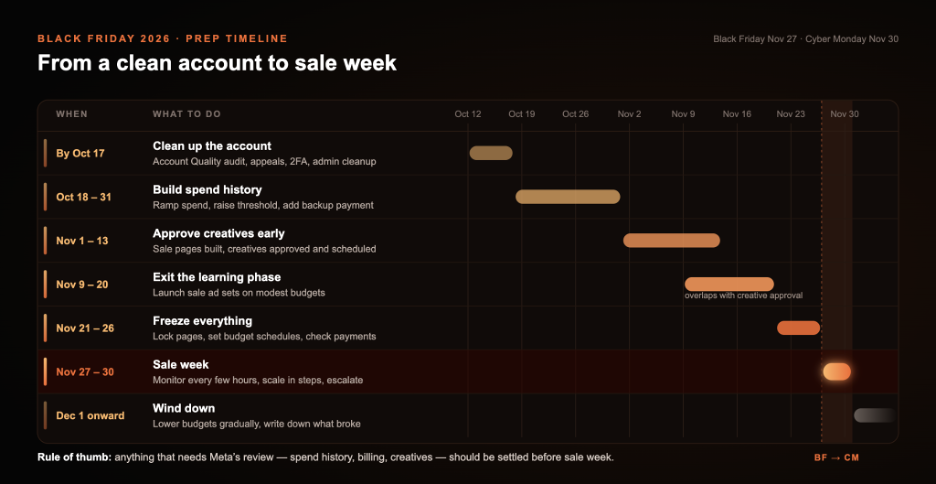
Black Friday 2026 timeline
Final thoughts
Black Friday rewards preparation. Accounts with clean history, approved creatives, pages that match the ads and a payment setup that can take the load usually just keep running. Accounts that try to scale overnight are the ones that end up in Account Quality on Friday morning.
If you want an account infrastructure that’s ready for peak week, talk to Digital Eagle about Trusted Agency Ad Accounts for Meta and 30+ other platforms. Set it up in October, and the sale itself becomes the easy part.
If you want an account infrastructure that’s ready for peak week, talk to Digital Eagle about Trusted Agency Ad Accounts for Meta and 30+ other platforms. Set it up in October, and the sale itself becomes the easy part.
FAQ
Why does Meta restrict ad accounts during Black Friday?
Sudden spending increases, rejected ads, payment failures and policy violations can disrupt campaigns during Black Friday. Review your account health, payment methods and ad creatives before the peak shopping period to reduce the risk.
What should I do if my Facebook ad account gets restricted during Black Friday?
Check Account Quality to identify the reason, fix any policy violations and request a review if the restriction appears incorrect. Contact Meta support or your agency account manager for assistance. Don’t create new accounts to bypass enforcement.
Can increasing my Meta Ads budget reset the learning phase?
Yes. Significant budget changes can cause ad sets to re-enter the learning phase, potentially affecting performance. Scale gradually, use budget scheduling where appropriate and avoid unnecessary edits during Black Friday.
Black Friday falls on November 27 this year, with Cyber Monday on November 30. Last year US shoppers spent a record $ 11.8 billion online on Black Friday alone, according to Adobe Analytics data. Most of that money moves in a few hours.
Ecommerce teams spend weeks getting ready: creative calendars, discount ladders, stock checks, but there are plenty of things that can throw a wrench in the works. Like suddenly getting your account restricted. Or maybe the card is declined at the billing threshold. Or perhaps a daily spending limit cuts delivery by lunchtime. Every hour offline during the peak week is revenue that won’t come back. Each restart resets campaigns back to the learning phase exactly when stable delivery matters most.
This guide covers what actually breaks Facebook ad accounts during Black Friday and the legitimate steps that prevent it. There will be tricks to get around moderation, that sooner rather than later stop working. Just preparation, that should give you more than enough time to do it properly.
Ecommerce teams spend weeks getting ready: creative calendars, discount ladders, stock checks, but there are plenty of things that can throw a wrench in the works. Like suddenly getting your account restricted. Or maybe the card is declined at the billing threshold. Or perhaps a daily spending limit cuts delivery by lunchtime. Every hour offline during the peak week is revenue that won’t come back. Each restart resets campaigns back to the learning phase exactly when stable delivery matters most.
This guide covers what actually breaks Facebook ad accounts during Black Friday and the legitimate steps that prevent it. There will be tricks to get around moderation, that sooner rather than later stop working. Just preparation, that should give you more than enough time to do it properly.
Why ad accounts break during the biggest sale of the year
Step 1: Run an account health check now
Step 2: Raise your spending ceiling before November
Step 3: Get creatives and landing pages approved before the rush
Step 4: Protect the learning phase
Step 5: Build redundancy into your account structure
If your ad account is restricted during the sale
Black Friday 2026 timeline
Final thoughts
FAQ
Step 1: Run an account health check now
Step 2: Raise your spending ceiling before November
Step 3: Get creatives and landing pages approved before the rush
Step 4: Protect the learning phase
Step 5: Build redundancy into your account structure
If your ad account is restricted during the sale
Black Friday 2026 timeline
Final thoughts
FAQ
Why ad accounts break during the biggest sale of the year
Black Friday doesn’t create any new risks. It stacks the existing ones into the same four days.
Every single one of these points is way easier to handle in October. All of them together dropping right on top of you on November 27 is how a month of work falls apart before noon.
- Spend spikes look like anomalies. An account that spent $ 2,000 a day in October and $ 15,000 on Thanksgiving stands out like a sore thumb. Meta applies a daily spending limit to new accounts and to accounts with quality issues, and that limit grows only with time and good standing.
- Review queues get longer. Meta says its ad review is typically completed within 24 hours, but can take longer. During a sale week, thousands of advertisers push new creatives at once. You can imagine how it affects the wait.
- Landing pages change at the worst moment. New prices, countdown timers, banners, sold-out products. Any of these can turn an approved ad into a noncompliant one.
- Payments fail. Higher spend hits the billing threshold more often. One declined charge can pause delivery across the account.
- Learning resets. Big edits during the sale send ad sets back into learning, and performance gets unstable.
Every single one of these points is way easier to handle in October. All of them together dropping right on top of you on November 27 is how a month of work falls apart before noon.
Step 1: Run an account health check now
Start in Account Overview. Look for rejected ads, pending appeals and restricted assets. Old violations matter: under Meta’s Advertising Standards, a violation found at any point can lead to restrictions on the Business Account or its assets, not only the ad.
- Fix or appeal open rejections this month. You don’t want an appeal still pending during the sale week.
- Complete business verification. Make sure the legal entity, payment method and website domain all point to the same company.
- Turn on two-factor authentication for every admin. A compromised admin profile is one of the fastest ways to lose a Business Manager.
- Add a second admin, so one locked personal profile doesn’t freeze the whole business.
- Remove old employees, freelancers and partners who no longer need access.
Step 2: Raise your spending ceiling before November
There’s no button that lifts a Meta-set daily spending limit on demand. It increases as the account stays in good standing, so the answer to a Meta ad account spending limit increase is history, not a support ticket filed on Thanksgiving Day.
Ramp spend gradually through late October and early November. Raise budgets in steps instead of jumping on sale week. An account that already spent close to Black Friday levels in mid-November looks normal on the day itself.
Then deal with payments, because this is where many accounts actually stumble:
Ramp spend gradually through late October and early November. Raise budgets in steps instead of jumping on sale week. An account that already spent close to Black Friday levels in mid-November looks normal on the day itself.
Then deal with payments, because this is where many accounts actually stumble:
- Raise the billing threshold early. Meta tends to increase it gradually as successful payments build up, so a request made in November may not land in time.
- Add a backup payment method to the ad account, ideally from a different issuer.
- Warn your bank. Tell the card issuer about expected volume so its fraud filters don’t block a large charge at 2 a.m.
- Check card limits. A corporate card that covers October spend may not cover three times that.
Step 3: Get creatives and landing pages approved before the rush
Meta’s own policy states that review may cover an ad’s images, video, text and targeting, plus its landing page or other destinations. It also says ads can be reviewed again after they go live. So approval on Monday doesn’t protect an ad whose page changes on Friday.
Industry reviews describe the current system as multimodal: text, images, audio and the landing page are checked together, as one unit, before the ad is shown. Some of these reviews call it MARS (Multimodal Ad Review System). Note that Meta itself hasn’t used this name in its official materials, so treat it as an industry label. The practical point holds either way: the ad and the page are judged together.
Black Friday creates its own set of mismatches:
The fix is mostly timing. Upload Black Friday creatives 10 to 14 days early and schedule them to start on the sale date, so they pass review while queues are still short. Point them at the final version of the sale page, not a draft. Once the sale starts, freeze page edits. If a price has to change, change the ad as well. And only make claims you can prove on the page.
Industry reviews describe the current system as multimodal: text, images, audio and the landing page are checked together, as one unit, before the ad is shown. Some of these reviews call it MARS (Multimodal Ad Review System). Note that Meta itself hasn’t used this name in its official materials, so treat it as an industry label. The practical point holds either way: the ad and the page are judged together.
Black Friday creates its own set of mismatches:
- Price gaps. The ad says 50% off, the page shows 30%, or the discount only applies to some items.
- Fake urgency. A countdown timer that resets on reload, or "last day" copy for a sale that runs a week.
- Sold-out products. The hero item sells out and the page turns thin or redirects somewhere else.
- Hidden conditions. Free shipping in the ad, a minimum order buried on the page.
- New pop-ups and redirects added for the sale and never checked.
The fix is mostly timing. Upload Black Friday creatives 10 to 14 days early and schedule them to start on the sale date, so they pass review while queues are still short. Point them at the final version of the sale page, not a draft. Once the sale starts, freeze page edits. If a price has to change, change the ad as well. And only make claims you can prove on the page.
Step 4: Protect the learning phase
Meta’s delivery system needs roughly 50 optimization events within seven days after launch or after a significant edit to exit the learning phase. Significant edits include changes to creative, targeting, the optimization event and large budget changes. In sale week, that reset is expensive.
- Launch Black Friday ad sets one to two weeks early on more modest budgets, so they exit learning before the sale starts.
- Use budget scheduling to raise budgets for specific dates and hours instead of editing them by hand at midnight.
- Scale in steps. Many media buyers keep single budget changes at around 20% to lower the chance of a reset.
- Consolidate. Fewer, larger ad sets collect events faster than many small ones.
- Don’t swap creatives inside winning ad sets mid-sale. Test new ads in a separate ad set.
Step 5: Build redundancy into your account structure
One ad account means a single point of failure. If it goes down on Black Friday, everything goes down with it. Legitimate redundancy means a second ad account under the same verified business, with its own payment method, warmed up with real spend and carrying the same compliant, already approved creatives.
One rule here is not optional. Meta does not allow advertisers to create new accounts to get around an enforcement. A backup account is for keeping compliant campaigns running if something technical fails, not for relaunching an ad that was rejected. If an account was restricted for a real violation, fix the violation first.
This is where agency ad accounts change the picture. Digital Eagle’s whitelisted agency accounts carry a higher trust level and are set up for high-volume spend, with 24/7 top-ups and a dedicated account manager. The ads still have to follow Meta’s policies. What changes is the infrastructure around them.
One rule here is not optional. Meta does not allow advertisers to create new accounts to get around an enforcement. A backup account is for keeping compliant campaigns running if something technical fails, not for relaunching an ad that was rejected. If an account was restricted for a real violation, fix the violation first.
This is where agency ad accounts change the picture. Digital Eagle’s whitelisted agency accounts carry a higher trust level and are set up for high-volume spend, with 24/7 top-ups and a dedicated account manager. The ads still have to follow Meta’s policies. What changes is the infrastructure around them.
If your ad account is restricted during the sale
Even good preparation doesn’t remove all risk. If an account is disabled during the sale, the order of actions matters.
- Stop editing. Open Account Quality and read the stated reason before touching anything.
- Fix the real issue. If an ad or page breaks a policy, pause the ad and correct the page first.
- Request a review in Account Quality if you believe the decision is wrong. Be specific about what you checked.
- Shift compliant spend to your backup account, but only if the restriction is limited to one ad account and isn’t tied to the business itself.
- Escalate. Contact your Meta rep or your agency account manager. With an agency account, one message usually reaches someone who can act.
- Document everything. Screenshot the ad, the landing page on mobile and desktop, and note timestamps. You’ll need them for the review.
Black Friday 2026 timeline
Final thoughts
Black Friday rewards preparation. Accounts with clean history, approved creatives, pages that match the ads and a payment setup that can take the load usually just keep running. Accounts that try to scale overnight are the ones that end up in Account Quality on Friday morning.
If you want an account infrastructure that’s ready for peak week, talk to Digital Eagle about Trusted Agency Ad Accounts for Meta and 30+ other platforms. Set it up in October, and the sale itself becomes the easy part.
If you want an account infrastructure that’s ready for peak week, talk to Digital Eagle about Trusted Agency Ad Accounts for Meta and 30+ other platforms. Set it up in October, and the sale itself becomes the easy part.
FAQ
Why does Meta restrict ad accounts during Black Friday?
Sudden spending increases, rejected ads, payment failures and policy violations can disrupt campaigns during Black Friday. Review your account health, payment methods and ad creatives before the peak shopping period to reduce the risk.
What should I do if my Facebook ad account gets restricted during Black Friday?
Check Account Quality to identify the reason, fix any policy violations and request a review if the restriction appears incorrect. Contact Meta support or your agency account manager for assistance. Don’t create new accounts to bypass enforcement.
Can increasing my Meta Ads budget reset the learning phase?
Yes. Significant budget changes can cause ad sets to re-enter the learning phase, potentially affecting performance. Scale gradually, use budget scheduling where appropriate and avoid unnecessary edits during Black Friday.
You might also like...